The structure of Structures
The prisms seen in the quick start are members of tnsgrt.structure.Structure. In fact,
tnsgrt.prism.Prism overloads only the constructor of tnsgrt.structure.Structure, which provides most
of the functionality.
Construction
Object of class tnsgrt.structure.Structure are composed of nodes and members.
Nodes are 3 x n numpy arrays:
import numpy as np
nodes = np.array([[0,0,0],[0,1,0],[1,0,0],[1,1,0]]).transpose()
Members are bars or strings, which are specified by a 2 x m array with the indices of the nodes that define the members, as in:
members = np.array([[0,1],[1,2],[2,3],[3,0],[0,2],[1,3]]).transpose()
Nodes and members are then combined to build a tnsgrt.structure.Structure:
from tnsgrt import Structure
s = Structure(nodes, members, number_of_strings=4)
The parameter number_of_strings = 4 means that the first four members are to be considered strings.
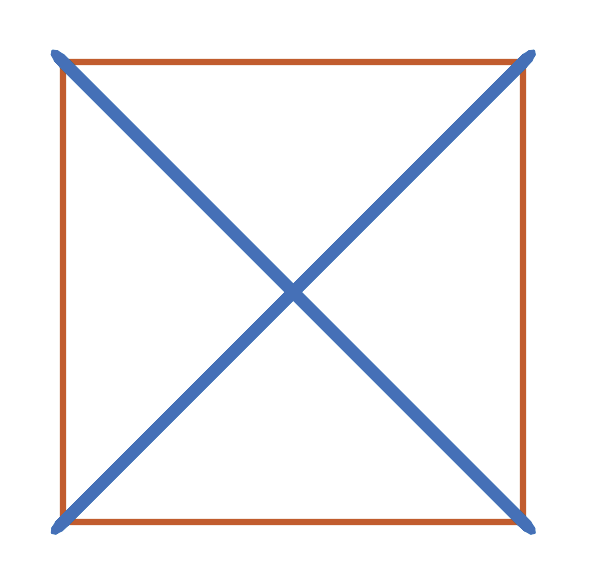
As before, the resulting structure can be plotted using tnsgrt.plotter.MatplotlibPlotter:
from tnsgrt.plotter.matplotlib import MatplotlibPlotter
plotter = MatplotlibPlotter()
plotter.plot(s)
fig, ax = plotter.get_handles()
ax.view_init(90,-90)
ax.axis('equal')
ax.axis('off')
plt.show()
to visualize the resulting planar tensegrity structure below:
Quite often, it is useful to view and modify the data stored in a Structure. The following examples show several ways of doing that.
Nodes and members
A string representation of a Structure displays its number of nodes, number of bars, and number of strings. Typing
print(s)
produces:
Structure with 4 nodes, 2 bars and 4 strings
A Structure has as attributes nodes,
s.nodes
which is a 3 x n numpy array
array([[0., 0., 1., 1.],
       [0., 1., 1., 0.],
       [0., 0., 0., 0.]])
storing the Structure’s nodes in its columns, and members
s.members
which is a 2 x m numpy array:
array([[0, 1, 2, 3, 0, 1],
       [1, 2, 3, 0, 2, 3]], dtype=int64)
storing the Structure’s members. Each column of member stores the indices of the
nodes to which the ends of a bar or of a string is connected to.
The values of nodes can be accessed or modified using the convenience methods
tnsgrt.structure.Structure.get_node_values() and
tnsgrt.structure.Structure.set_node_values(). For example:
s.set_node_values([2, 3], np.array([[2, 1, 0], [2, 0, 0]]).transpose())
modify the location of nodes 2 and 3, and
s.get_node_values([2, 3])
retrieves the updated values:
array([[2., 2.],
       [1., 0.],
       [0., 0.]])
The change is reflected in the structure geometry, which now looks as in the new figure
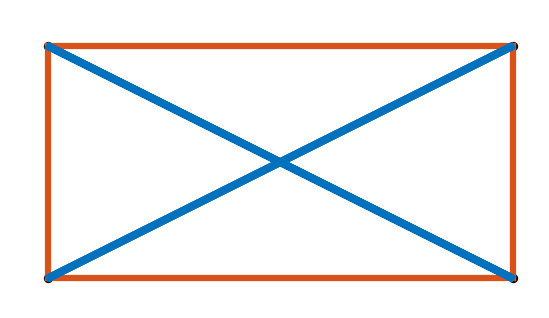
generated by the code
from tnsgrt.plotter.matplotlib import MatplotlibPlotter
plotter = MatplotlibPlotter()
plotter.plot(s)
fig, ax = plotter.get_handles()
ax.view_init(90,-90)
ax.axis('equal')
ax.axis('off')
plt.show()
Properties
Node and member properties are stored as pandas’ Dataframes. In this example
s.node_properties
returns the dataframe:
   radius  visible constraint          facecolor          edgecolor
0   0.002     True       None  (0, 0.447, 0.741)  (0, 0.447, 0.741)
1   0.002     True       None  (0, 0.447, 0.741)  (0, 0.447, 0.741)
2   0.002     True       None  (0, 0.447, 0.741)  (0, 0.447, 0.741)
3   0.002     True       None  (0, 0.447, 0.741)  (0, 0.447, 0.741)
and
s.member_properties
returns:
   lambda_  force  stiffness  volume  radius  inner_radius  mass  rest_length
0      0.0    0.0        0.0     0.0   0.005           0.0   1.0          0.0  \
1      0.0    0.0        0.0     0.0   0.005           0.0   1.0          0.0
2      0.0    0.0        0.0     0.0   0.005           0.0   1.0          0.0
3      0.0    0.0        0.0     0.0   0.005           0.0   1.0          0.0
4      0.0    0.0        0.0     0.0   0.010           0.0   1.0          0.0
5      0.0    0.0        0.0     0.0   0.010           0.0   1.0          0.0

           yld  density       modulus  visible             facecolor
0  250000000.0   7850.0  2.000000e+11     True  (0.85, 0.325, 0.098)  \
1  250000000.0   7850.0  2.000000e+11     True  (0.85, 0.325, 0.098)
2  250000000.0   7850.0  2.000000e+11     True  (0.85, 0.325, 0.098)
3  250000000.0   7850.0  2.000000e+11     True  (0.85, 0.325, 0.098)
4  250000000.0   7850.0  2.000000e+11     True     (0, 0.447, 0.741)
5  250000000.0   7850.0  2.000000e+11     True     (0, 0.447, 0.741)

              edgecolor  linewidth linestyle
0  (0.85, 0.325, 0.098)          2         -
1  (0.85, 0.325, 0.098)          2         -
2  (0.85, 0.325, 0.098)          2         -
3  (0.85, 0.325, 0.098)          2         -
4     (0, 0.447, 0.741)          2         -
5     (0, 0.447, 0.741)          2         -
The DataFrames can be manipulated directly or one can use convenience methods that will be discussed later.
Properties are populated with default values taken from
Structure.NodeProperty, Structure.MemberProperty, and the
values in the dictionary
Structure.member_defaults
returns the dictionary:
{'bar': {'facecolor': (0, 0.447, 0.741), 'edgecolor': (0, 0.447, 0.741)},
 'string': {'facecolor': (0.85, 0.325, 0.098),
  'edgecolor': (0.85, 0.325, 0.098),
  'radius': 0.005}}
The keys in this dictionary are tags, which we discuss next.
Member and node properties
Even though it is possible to manipulate the property
DataFrames directly, it is often easier to use the provided
convenience methods.
For example
s.get_member_properties(s.get_members_by_tag('vertical'), 'radius', 'facecolor', 'edgecolor')
retrieves a view of the member’s properties:
   radius             facecolor             edgecolor
0   0.005  (0.85, 0.325, 0.098)  (0.85, 0.325, 0.098)
2   0.005  (0.85, 0.325, 0.098)  (0.85, 0.325, 0.098)
for all members that have vertical as a tag.
Conversely
s.set_member_properties(s.get_members_by_tag('vertical'), 'radius', 0.04)
sets the radius property of the members that have vertical
tnsgrt.structure.Structure.set_member_properties() can also be used
to set multiple values at the same time, as in
from tnsgrt.utils import Colors

s.set_member_properties(s.get_members_by_tag('vertical'),
                      'facecolor', Colors.GREEN.value,
                      'edgecolor', Colors.GREEN.value,
                      'mass', 2)
Retrieving the properties confirm the changes:
s.get_member_properties(s.get_members_by_tag('vertical'), 'radius', 'mass', 'facecolor', 'edgecolor')
in the dataframe:
   radius  mass              facecolor              edgecolor
0    0.04   2.0  (0.466, 0.674, 0.188)  (0.466, 0.674, 0.188)
2    0.04   2.0  (0.466, 0.674, 0.188)  (0.466, 0.674, 0.188)
These changes are also reflected on the structure’s plot generated by the following code.
plotter = MatplotlibPlotter()
plotter.plot(s)
fig, ax = plotter.get_handles()
ax.view_init(90,-90)
ax.axis('equal')
ax.axis('off')
plt.show()